主要内容 #
什么是编程
编程的作用
编程语言的概念
Python历史
Python特点
1. 初识计算机及编程 #
计算机在硬件设计制造的时候,就已经被人设计了一些最基本的指令,用来规定该计算机能够进行的基本操作。
每一条基本指令都规定了计算机系统的一个特定动作,这些指令一起构成了该计算机的指令系统。
编程,即编写程序。
编写程序的过程,可以理解为:
在遵循特定的编程语言规则下,去编写一系列的代码,让计算机按照人类的逻辑和思想去完成所需要的任务。
在计算机应用的初期,程序员使用计算机自带的基本指令(也称为机器语言)来编写计算机程序。
直接使用机器语言编写程序的优点是执行效率非常高,但缺点是编程工作量极大,不容易记忆,通用性差,而且容易出错。
所以后来发展出了许多高级编程语言,使得编写程序更加简单,方便。
2. 编程的作用 #
- 通过编程,可以让计算机帮助我们高效地完成很多重复、繁琐、以及人类难以完成的的工作
- 生活中很多应用都是通过编程实现的,比如游戏、视频娱乐、社交软件
例如:通过编程的形式对数字进行从小到大的顺序进行排序:
以下程序使用冒泡排序法:
import random
import time

arr = []
for i in range(10000):
    arr.append(random.randint(1,10000))

#冒泡排序
def Sort_bubble(arr):
    for i in range(len(arr)):
        for j in range(len(arr)-i-1):
            if arr[j]>arr[j+1]:
                arr[j],arr[j+1]=arr[j+1],arr[j]

    return arr

print('排序前:',arr)

temp = input("请按回车键开始排序: ")
print("排序开始,请稍等......")

sTime=time.time()

print('排序后:',Sort_bubble(arr))  #冒泡排序

eTime=time.time()
print('排序总共用时:',eTime-sTime,'秒')
以下程序使用快速排序法:
import random
import time

arr = []
for i in range(10000):
    arr.append(random.randint(1,10000))

#快速排序
def partition(arr,low,high):
    i = ( low-1 )
    pivot = arr[high]
    for j in range(low , high):
        if arr[j] <= pivot:
            i=i+1
            arr[i],arr[j]=arr[j],arr[i]
    arr[i+1],arr[high]=arr[high],arr[i+1]
    return (i+1)

def Sort_quick(arr,low,high):
    if low < high:
        p=partition(arr,low,high)
        Sort_quick(arr, low, p-1)
        Sort_quick(arr, p+1, high)
    return arr

print('排序前:',arr)
temp = input("请按回车键开始排序: ")
print("排序开始,请稍等......")
sTime=time.time()
print('排序后:',Sort_quick(arr,0,len(arr)-1))   #快速排序
eTime=time.time()
print('排序总共用时:',eTime-sTime,'秒')
以下是一个用Python编写的抽奖程序:
import time
import threading
import tkinter as tk  # 导入 tk库 模块
import random         # 导入 随机库 模块

root = tk.Tk()      #初始化Tk() 建立一个窗口
root.title('大师码简易抽奖') # 设置标题
root.minsize(1220, 930)

label1 = tk.Label(root, text='谢谢惠顾', bg='yellow', font=('Arial', 40))
label1.place(x=5, y=225, width=300, height=220)

label2 = tk.Label(root, text='作业一份', bg='yellow', font=('Arial', 40))
label2.place(x=5, y=5, width=300, height=220)

label3 = tk.Label(root, text='谢谢惠顾', bg='yellow', font=('Arial', 40))
label3.place(x=305, y=5, width=300, height=220)

label4 = tk.Label(root, text='三等奖', bg='yellow', font=('Arial', 40))
label4.place(x=605, y=5, width=300, height=220)

label5 = tk.Label(root, text='再来一次', bg='yellow', font=('Arial', 40))
label5.place(x=905, y=5, width=300, height=220)

label6 = tk.Label(root, text='谢谢惠顾', bg='yellow', font=('Arial', 40))
label6.place(x=905, y=225, width=300, height=220)

label7 = tk.Label(root, text='三等奖', bg='yellow', font=('Arial', 40))
label7.place(x=905, y=445, width=300, height=220)

label8 = tk.Label(root, text='谢谢惠顾', bg='yellow', font=('Arial', 40))
label8.place(x=905, y=665, width=300, height=220)

label9 = tk.Label(root, text='一等奖', bg='yellow', font=('Arial', 40))
label9.place(x=605, y=665, width=300, height=220)

label10 = tk.Label(root, text='谢谢惠顾', bg='yellow', font=('Arial', 40))
label10.place(x=305, y=665, width=300, height=220)

label11 = tk.Label(root, text='二等奖', bg='yellow', font=('Arial', 40))
label11.place(x=5, y=665, width=300, height=220)

label12 = tk.Label(root, text='再来一次', bg='yellow', font=('Arial', 40))
label12.place(x=5, y=445, width=300, height=220)

label13 = tk.Label(root, text='最终解释权归【大师码教育】所有', bg='white', font=('Arial', 10))
label13.place(x=900, y=885, width=300, height=50)

# 将所有抽奖选项添加到列表
things = [label1, label2, label3, label4, label5, label6, label7, label8, label9, label10,label11, label12]
# 获取列表的最大索引值
maxvalue = len(things) - 1

# 设置起始值为随机整数
starts = random.randint(0, 6)
# 是否停止标志
notround = False

# 定义滚动函数
def round():
    t = threading.Thread(target=startup) #启动start
    t.start()

# 定义开始函数
def startup():
    global starts
    global notround
    while True:
        # 检测停止按钮是否被按下
        if notround == True:
            notround = False
            return starts
        # 程序延时
        time.sleep(0.017)

        # 在所有抽奖选项中循环滚动
        for i in things:
            i['bg'] = 'lightSkyBlue' #开始时 底色变成天蓝
        things[starts]['bg'] = 'red' #滚动框为 红色
        starts = starts + 1
        if starts > maxvalue:
            starts = 0

# 定义停止函数
def stops():
    global notround # notround 为全局变量
    global starts

    notround = True  #停止标志位
    if starts == 1:  # 如果抽中“数学作业”就跳转为“谢谢惠顾”【想多写作业,不可能!!!^_^】
        starts = 2

# 设置启动按键      背景文本为“RUN”  底色为“天蓝”    字体“Arial” 字体大小“40”   回调函数command 为【滚动函数】
btn1 = tk.Button(root, text='开始', bg='lightSkyBlue', font=('Arial', 40), command=round)
#设置按键坐标
btn1.place(x=400, y=350, width=200, height=200)
# 设置停止按键      背景文本为“RUN”  底色为“红色”    字体“Arial” 字体大小“40”   回调函数command 为【停止函数】
btn2 = tk.Button(root, text='停止', bg='red', font=('Arial', 40), command=stops)
#设置按键坐标
btn2.place(x=600, y=350, width=200, height=200)

# 循环,时刻刷新窗口
root.mainloop()
3. 编程语言的概念 #
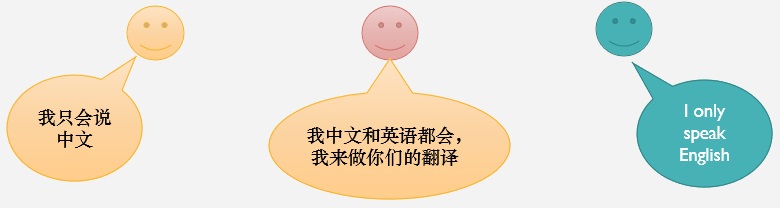
人类用自己的语言进行交流,而计算机则用编程语言进行交流。
所以只要人类学会了编程语言,就可以与计算机交流。
人类用于交流的语言很多,比如:汉语、英语、日语、法语等等。
计算机用于交流的语言也很多,比如:机器语言、汇编、Scratch、c、c++、Java、PHP、Python等。
严格来说,计算机只有一种语言,那就是二进制,俗称机器语言,比如:01000110。
那计算机是如何理解其它的编程语言呢?
人类给计算机创造了能够同时让计算机以及人类理解的语言,
然后通过已有的机器语言,去编写了一个翻译程序,该翻译程序将所创造的语言翻译成机器语言。
这样计算机就能理解我们通过编程语言来写的指令了。
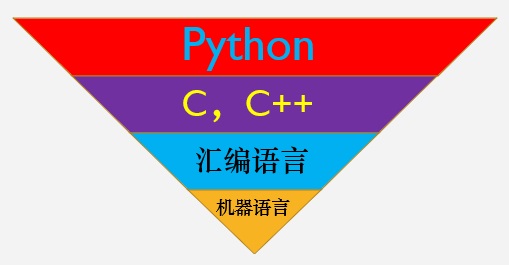
以下为编写语言的关系:
最下层的是机器语言,只能执行由0和1组成的指令。
为了方便理解机器语言,莫奇莱等人想到用助记符来代替0,1代码,于是汇编语言出现了。
但是汇编语言在程序方面依然比较复杂,也具有较高的出错率。
后来人们对多条指令进行整合,将其变为单条指令,这样其他人就不需要关注期间的操作细节和过程。
由此不端发展出了多种编程语言,多种编程语言又再次进行组合,这就成了高级语言。
Python就属于高级语言。
4. Python历史 #
1989年的圣诞节,一个名叫 Guido von Rossum 的荷兰程序员为了打发无聊的圣诞节假期开始写 Python 语言的编译/解释器。
1991年,第一个 Python 编译器(解释器)诞生,它用C语言实现。
2000年10月16日,Python 2.0版本产生。
2008年12月3日,Python3.0版本产生。
现如今,Python已经被广泛应用在了各种领域,包括工程、信息技术、科学、商务、娱乐等。
许多知名的大公司都在使用Python,例如:Google、NASA、迪斯尼、皮克斯和梦工厂等。
Guido van Rossum(荷兰人),从阿姆斯特丹大学获得了数学和计算机硕士学位。
所以他可以称得上是一名数学家,或者更确切点是精通数学与计算机的复合型人才。

5. Python特点 #
- 简单易学
Python语法简单,极易上手
- 免费、开源
可以对它的源代码进行拷贝,修改,发布,或者应用于自己写的软件中。
- 可移植性好
Python已经被移植到许多平台上,所以Python程序可以在很多平台上运行,比如:
Linux\Windows\OS\Macintosh\VMS\PlayStation等等
- 可扩展性好
Python可以直接调用C或C++编写的程序,以此运行一些速度要求很高的应用
- 非常丰富的库
有着非常庞大的库可供调用,以处理各种工作,包括文件、数据库、网页、图形用户界面等等
6. 小结 #
- 编程,就是在遵循特定的编程语言规则下,去编写一系列的代码
- 编程语言为计算机可以理解的语言
- Python之父是Guido von Rossum
习题 #
- 根据这节课所讲的内容,尽情发挥自己的想像,描述自己对编程的理解。


